If you’re serious about optimizing your vehicle’s performance, understanding OBD data loggers is essential. These devices can provide real-time insights into your car’s health and efficiency. With so many options available in 2026, it can be tough to choose the right one. Whether you’re troubleshooting issues or simply looking to enhance your driving experience, knowing what to look for can make all the difference. Let’s explore the top contenders that could transform how you monitor your vehicle’s performance.
FOXWELL NT301 OBD2 Scanner for Check Engine Light

If you’re a home mechanic or run an auto shop, the FOXWELL NT301 OBD2 Scanner is your go-to tool for tackling check engine light issues. This professional diagnostic tool reads DTCs, accesses emissions readiness status, and turns off the check engine light with ease. With live data functionality, you can graph and log accurate error codes. It’s compatible with most vehicles, including SUVs and light trucks, and supports various OBDII protocols. Plus, it’s easy to use—just plug it into the OBD2 port, and you’re ready to diagnose problems without needing updates. Enjoy free lifetime updates and solid customer support!
Best For: Home mechanics and auto shop owners looking for a reliable and user-friendly diagnostic tool to manage check engine light issues.
Pros:
- Provides live data graphing and logging for accurate error code reading.
- Compatible with a wide range of vehicles and OBDII protocols.
- No updates required before use, making it simple to operate right out of the box.
Cons:
- Limited to OBD2 vehicles, which may exclude older models.
- Some users may find the 2.8-inch screen size less ideal for detailed diagnostics.
- Compatibility can vary based on specific vehicle models and years.
ANCEL AD310 OBD II Scanner Car Engine Fault Code Reader

The ANCEL AD310 OBD II Scanner is an ideal choice for car owners looking to quickly diagnose check engine light issues without the hassle of complex tools. This compact device is compatible with all vehicles from 1996 and newer, making it a versatile option. It features the CEL Doctor, recommended by Scotty Kilmer, to help identify the causes of your check engine light. You can read and clear diagnostic trouble codes, view live data, and check I/M monitor readiness. With sturdy construction and a user-friendly interface, you’ll find it straightforward and effective for maintaining your vehicle’s performance.
Best For: Car owners seeking a straightforward and effective tool to diagnose check engine light issues in vehicles from 1996 and newer.
Pros:
- Easy to use with a user-friendly interface and clearly labeled buttons.
- Quickly reads and clears diagnostic trouble codes, providing accurate results in seconds.
- Compact and portable design allows for easy transport and storage.
Cons:
- Limited to diagnosing emission-related issues; cannot read unrelated engine fault codes.
- Only compatible with OBDII interface vehicles; not suitable for OBDI vehicles, even with adapters.
- Lacks advanced features found in more expensive scanners, such as detailed diagnostics.
BlueDriver Bluetooth Pro OBDII Scan Tool for iPhone & Android

For car enthusiasts and everyday drivers alike, the BlueDriver Bluetooth Pro OBDII Scan Tool offers an accessible way to diagnose vehicle issues without the hassle of subscriptions or complicated setups. This tool is compatible with all gas vehicles from 1996 onward, allowing you to diagnose over 7,000 potential problems, including check engine, ABS, and airbag issues. You can read and clear trouble codes and access live data while driving. Its user-friendly app provides unlimited repair reports with fixes and 24/7 support. Plus, with Bluetooth connectivity, you can easily connect to your phone or tablet.
Best For: Car enthusiasts and everyday drivers looking for an easy-to-use diagnostic tool without subscription fees.
Pros:
- User-friendly app with a database of repair videos and step-by-step directions.
- Bluetooth connectivity allows for a wireless connection to your phone or tablet, making diagnostics convenient.
- Comprehensive diagnostics covering over 7,000 issues, including check engine, ABS, and airbag problems.
Cons:
- Limited to gas vehicles manufactured from 1996 onward, excluding older or diesel vehicles.
- Dependent on smartphone compatibility, which may not suit all users or devices.
- Real-time data may vary based on vehicle make and model, potentially limiting diagnostic accuracy.
Garmin eLog Electronic Logging Device (FMCSA Compliant)

Garmin’s eLog Electronic Logging Device (ELD) stands out as an ideal choice for drivers and fleet operators seeking a straightforward, FMCSA-compliant solution for Hours of Service (HOS) recording. With no subscription fees, you make a simple one-time purchase for model 010-01876-00. This device supports 9-pin J1939 and 6-pin J1708 diagnostic ports, ensuring compatibility with various vehicles, though you’ll need a separate cable for certain Volvo engines. Store your ELD records securely on a compatible smartphone and access them easily via USB or Bluetooth. Plus, the free Garmin eLog app enhances your compliance experience, making it user-friendly.
Best For: Drivers and fleet operators seeking a straightforward, FMCSA-compliant solution for Hours of Service (HOS) recording without ongoing subscription fees.
Pros:
- No subscription fees; only a one-time purchase required.
- Compatible with a variety of vehicles through 9-pin J1939 and 6-pin J1708 ports.
- User-friendly Garmin eLog app enhances the compliance experience and allows easy data access.
Cons:
- Not compatible with OBD-II protocol (SAE J1979), limiting some vehicle options.
- Separate cable required for certain Volvo engines, adding to the overall cost.
- Access to ELD records is dependent on a compatible smartphone for secure storage.
Innova 5210 OBD2 Scanner & Engine Code Reader

If you’re looking for a reliable diagnostic tool that delivers thorough insights into your vehicle’s health, the Innova 5210 OBD2 Scanner & Engine Code Reader stands out. This versatile device tests batteries, accesses live data, and resets oil lights, compatible with most vehicles from 1996 onward. You can read and clear check engine and ABS codes while monitoring vital data like RPM and engine temperature. The built-in RepairSolutions2 app offers verified fixes and step-by-step guidance without hidden fees. Use the coverage checker to verify compatibility, making it an essential tool for maintaining your vehicle’s performance and readiness for emissions tests.
Best For: Car owners and DIY mechanics looking for an affordable and user-friendly diagnostic tool to maintain their vehicles.
Pros:
- Easy to Use: Intuitive interface with step-by-step guidance through the RepairSolutions2 app.
- Comprehensive Compatibility: Works with most US, Asian, and European vehicles from 1996 onward.
- Multiple Functions: Offers various maintenance features like oil light reset and I/M readiness status check.
Cons:
- Variable Coverage: Diagnostic features may differ based on vehicle make, model, and year.
- Limited Advanced Functions: May not provide as in-depth diagnostics as higher-end professional scanners.
- App Dependency: Some features and support are reliant on the use of the RepairSolutions2 app.
OBDLink MX+ OBD2 Bluetooth Scanner for iPhone, Android, and Windows

The OBDLink MX+ OBD2 Bluetooth Scanner is an essential tool for car enthusiasts and DIY mechanics looking to elevate their diagnostic capabilities. This versatile scanner transforms your smartphone or Windows PC into a professional-grade diagnostic tool, compatible with apps like FORScan, Torque, and BimmerCode. It offers enhanced OEM support for various brands, including Ford, GM, and Honda. You can easily clear the Check Engine Light and access live parameters such as ABS and TPMS. Plus, it features over-voltage protection and regular firmware updates, ensuring your device stays up-to-date and safe during use. Experience exceptional diagnostics with the OBDLink MX+.
Best For: Car enthusiasts and DIY mechanics looking for a professional-grade diagnostic tool for various vehicle brands.
Pros:
- Enhanced Compatibility: Works seamlessly with popular apps like FORScan, Torque, and BimmerCode.
- Comprehensive Diagnostics: Access to a wide range of live parameters, including ABS and TPMS, along with the ability to clear Check Engine Lights.
- Safety Features: Equipped with over-voltage protection and regular firmware updates for reliable use.
Cons:
- Device Dependency: Requires a compatible smartphone or Windows PC for operation, limiting standalone functionality.
- Brand Specificity: Optimal performance may vary depending on the vehicle brand and model.
- Learning Curve: May require some technical knowledge to fully utilize all features and capabilities.
OBDLink EX FORScan OBD Adapter

Designed specifically for FORScan users, the OBDLink EX OBD Adapter stands out with its ability to support all Ford protocols and advanced features, making it an ideal choice for those seeking dealership-level diagnostics. This adapter provides seamless access to all modules, ensuring thorough vehicle analysis. Its electronic switch allows FORScan to access all CAN buses simultaneously, revealing advanced functions that toggle switch adapters can’t achieve. With a throughput up to 20 times faster than alternatives, you’ll enjoy efficient data processing. Plus, its rock-solid connection prevents data corruption, guaranteeing reliable communication with your vehicle’s systems.
Best For: Anyone seeking dealership-level diagnostics and advanced vehicle analysis for Ford vehicles using FORScan.
Pros:
- Supports all Ford protocols and advanced FORScan features for comprehensive diagnostics.
- Electronic switch enables simultaneous access to all CAN buses, unlocking advanced functions.
- Up to 20 times faster data throughput compared to toggle switch adapters, ensuring efficient processing.
Cons:
- Designed specifically for FORScan, may not be compatible with other OBD software.
- Higher price point compared to basic OBD adapters.
- Requires knowledge of FORScan to utilize advanced features effectively.
OBD2 Scanner Bluetooth Wireless Auto Diagnostic Tool for iOS & Android
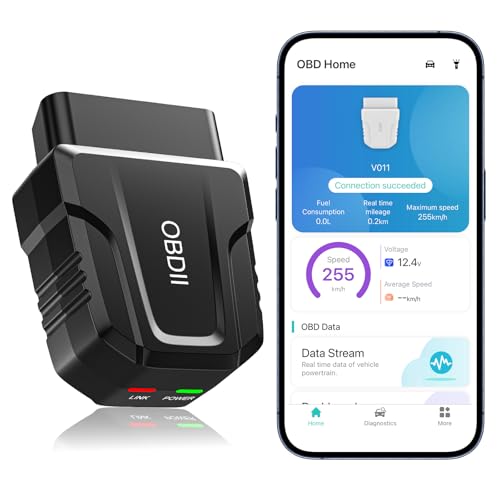
For car enthusiasts and everyday drivers alike, the OBD2 Scanner Bluetooth Wireless Auto Diagnostic Tool offers a seamless way to monitor your vehicle’s health. Compatible with both iOS and Android, this lightweight tool connects effortlessly via Bluetooth 5.4 technology, allowing you to access real-time data and diagnostic reports. You’ll appreciate its user-friendly app that interprets check engine lights and suggests fixes, saving you from costly repair shop visits. Supporting over 96% of vehicles from 1996 onward, it’s perfect for most car makes. Plus, with 24-hour customer support, you’ll have assistance whenever you need it.
Best For: Car enthusiasts and everyday drivers looking for an easy-to-use diagnostic tool to monitor vehicle health and troubleshoot issues.
Pros:
- User-friendly design with an intuitive app that helps interpret check engine lights and suggests fixes.
- Bluetooth 5.4 technology ensures a fast and reliable wireless connection, eliminating the need for cumbersome wires.
- Broad vehicle compatibility supporting over 96% of car makes and models from 1996 onwards.
Cons:
- Codes can only be cleared after repairs, requiring a computer at a repair shop if not addressed.
- Battery drain concerns if the device is not unplugged after use.
- Limited advanced features compared to some higher-end diagnostic tools, which may not satisfy professional mechanics.
INNOVA 3040RS OBD2 Scanner

If you’re a home mechanic looking for an accessible yet powerful tool, the INNOVA 3040RS OBD2 Scanner is an excellent choice. This user-friendly scanner simplifies vehicle diagnostics, allowing you to reset check engine, brake, and oil lights without online searches. It connects to global OBD2 systems, offering ten diagnostic modes and unlimited vehicle health reports. You’ll appreciate its real-time data streaming, which gives insights into RPM, speed, and oil temperature. Plus, it tests your battery and alternator, helping you troubleshoot starting issues. With free updates and mechanic-recommended fixes, you’ll feel empowered to tackle any automotive challenge.
Best For: Home mechanics seeking an easy-to-use diagnostic tool with professional capabilities.
Pros:
- Provides free mechanic-recommended fixes and estimated repair costs.
- Offers real-time data streaming for effective problem identification.
- Simplifies vehicle diagnostics with user-friendly features, making it accessible for beginners.
Cons:
- Compatibility may be limited to select vehicle makes and models.
- May not cover all advanced diagnostic functions found in more expensive scanners.
- Requires periodic updates for optimal performance, which may be a hassle for some users.
Autel Professional OBD2 Scanner AL319 Code Reader
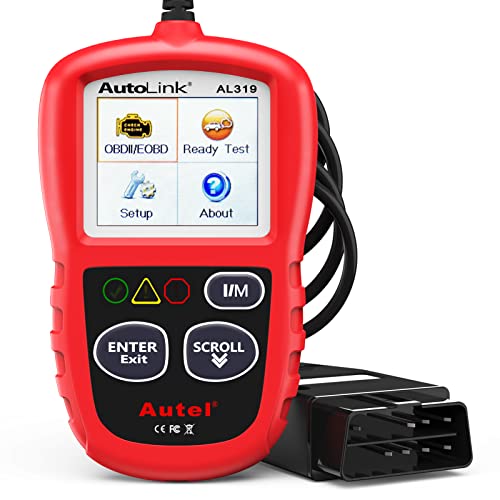
The Autel Professional OBD2 Scanner AL319 Code Reader stands out as an ideal choice for DIY enthusiasts and everyday drivers who want to take control of their vehicle’s diagnostics. This enhanced tool efficiently reads DTCs, live data, and I/M readiness for any OBDII vehicle post-1996. With its “plug and play” setup, you’ll appreciate the user-friendly interface and patented One-Click I/M Readiness function. Compatible with various makes, it supports multiple languages, ensuring accessibility for everyone. Plus, its lifetime updates and 12-month warranty make it a cost-effective solution, helping you catch potential issues before they lead to expensive repairs.
Best For: DIY enthusiasts and everyday drivers seeking an affordable and efficient way to diagnose their vehicle’s issues.
Pros:
- Easy “plug and play” setup with a user-friendly interface.
- Supports multiple languages and a wide range of post-1996 OBDII vehicles.
- Lifetime free updates and a 12-month warranty enhance value.
Cons:
- Limited to OBDII vehicles; may not work with older models.
- Basic functionalities may not meet the needs of advanced users.
- No advanced diagnostic features compared to higher-end models.
Factors to Consider When Choosing an OBD Data Logger
When choosing an OBD data logger, you need to contemplate several key factors. Think about compatibility with your vehicle type, the diagnostic functionality it offers, and how user-friendly the interface is. Additionally, check the connectivity options and whether it provides reliable data logging and reporting features.
Compatibility With Vehicle Types
Choosing the right OBD data logger requires careful consideration of your vehicle’s compatibility, especially since different makes and models may have unique requirements. Most modern vehicles, particularly those built after 1996, use OBDII standards, so ensuring your logger supports this is key. While many OBD data loggers work with cars, SUVs, and light trucks, compatibility can vary based on specific protocols like KWP2000, J1850 VPW, and CAN. If you own an older OBDI vehicle, be cautious, as some loggers may not function even with adapters. Always verify the compatibility features listed in the manufacturer’s specifications to avoid any diagnostic issues down the road. This diligence will help you choose the best tool for your vehicle.
Diagnostic Functionality and Features
Selecting an OBD data logger means focusing on its diagnostic functionality and features to guarantee you get the most out of your investment. Prioritize options that let you read and clear diagnostic trouble codes (DTCs), so you can efficiently resolve check engine light issues. Look for live data streaming capabilities, which allow real-time monitoring of key parameters like engine temperature and RPM for accurate diagnostics. Make sure the device includes I/M readiness checks to assess emissions systems’ status, aiding compliance with regulations. Freeze frame data is also essential, capturing critical vehicle information when a fault code triggers. Finally, opt for models supporting multiple OBD-II protocols to enhance compatibility across various vehicles, maximizing your diagnostic potential.
User-Friendly Interface Design
A user-friendly interface design is crucial for maximizing your experience with an OBD data logger, especially if you’re not a tech expert. Look for clearly labeled buttons and an intuitive layout to make navigation simple, regardless of your technical skills. A large, clear screen that displays diagnostic information in an easy-to-read format enhances your experience when reading codes and troubleshooting. Visual aids like graphs and charts help you understand live data, making it easier to interpret engine performance metrics. A straightforward connection process, such as plug-and-play or wireless options, minimizes setup time. Finally, verify the data logger comes with a thorough manual and accessible support options to boost your confidence in using its features effectively.
Connectivity Options and Support
Steering through the world of OBD data loggers goes beyond just user-friendly interfaces; connectivity options play a significant role in your overall experience. As you choose a data logger, consider whether it offers wired connections, like USB or OBD-II ports, or wireless options such as Bluetooth and Wi-Fi. This guarantees compatibility with your devices. Make certain the logger supports various platforms, including iOS, Android, and Windows, for maximum accessibility. Look for real-time data streaming capabilities to monitor engine performance while driving. Robust app integration is essential for reading and clearing codes, accessing live data, and generating repair reports. Finally, evaluate security features to protect against unauthorized access and guarantee reliable data transmission.
Data Logging and Reporting
When choosing an OBD data logger, understanding data logging and reporting features is essential for effective vehicle diagnostics. Data logging collects and stores information from your vehicle’s onboard diagnostics system, allowing you to analyze performance and issues over time. Look for loggers that provide real-time data monitoring, capturing key parameters like engine temperature, RPM, and fuel trims. This thorough diagnostics capability can be invaluable. Reporting features should include detailed insights on vehicle health, fault codes, and diagnostic trouble codes (DTCs) to aid troubleshooting. Advanced models may offer live data graphing, helping you visualize trends in performance. Regular logging not only identifies recurring issues but also helps you monitor repair effectiveness, leading to more informed maintenance decisions.
Cost and Warranty Considerations
Understanding the cost and warranty factors is just as essential as grasping the data logging features. First, assess the initial purchase cost to guarantee it fits your budget, while also factoring in any ongoing expenses for updates or subscriptions. A longer warranty period can offer peace of mind, reflecting the manufacturer’s confidence in their product’s reliability. Don’t forget to evaluate additional costs, like compatibility with specific vehicle models or extra accessories, which can affect your overall investment. Look for data loggers that provide free lifetime updates to save money as vehicle technologies evolve. Finally, read customer reviews about warranty claims and support experiences to gauge the manufacturer’s responsiveness, which can influence your decision considerably.